


All India Scholarship Helpline : 8050067687

Storelocale

Last Update On

Staff 3

StoreLocale AI: Translate App Screenshots into 32 Languages & Create Global App Store Designs

CIGMA Pedia Whatsapp Community

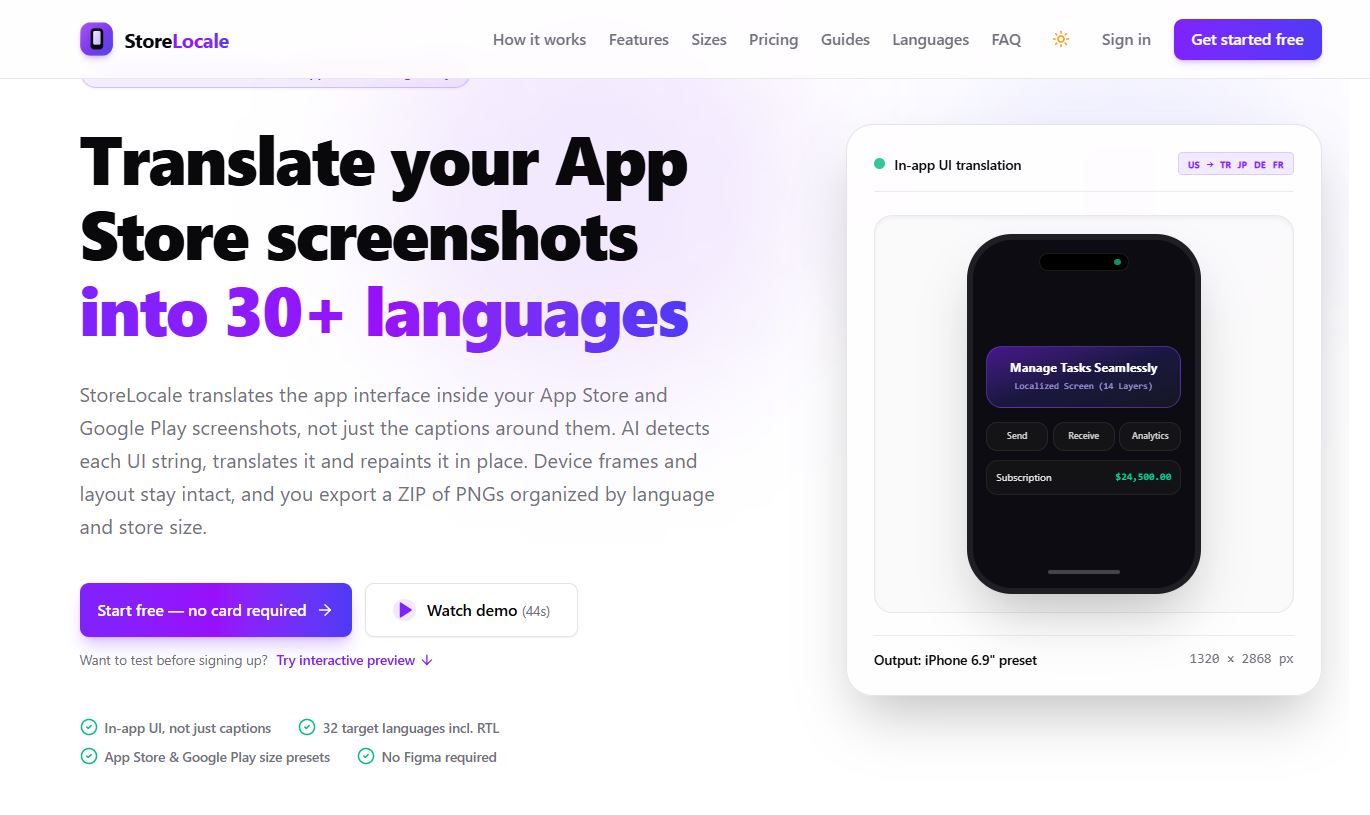
StoreLocale AI: Translate App Screenshots into 32 Languages & Create Global App Store Designs It is an AI-powered tool that helps app developers translate App Store and Google Play screenshots into different languages. It detects text inside app screenshots, translates it, and replaces the original text while keeping the design and layout as consistent as possible. It supports 32 target languages, including Arabic, Hindi, Japanese, German, and Chinese. StoreLocale also provides device frames, design templates, editing tools, and export options. It helps developers prepare localized screenshots for different markets without needing advanced design skills or separate design software.
5 Benefits of Using of StoreLocale AI

  1. Saves time: Translates multiple app screenshots without manual redesign.
  2. Supports global reach: Helps developers present their apps to international audiences.
  3. Reduces design work: Provides ready-to-use frames, templates, and editing tools.
  4. Improves localization: Translates both marketing captions and text inside app screenshots.
  5. Easy export: Downloads organized screenshot files for different app stores.

Features of StoreLocale AI

  • AI Screenshot Translation: StoreLocale detects text inside app screenshots, translates it into the selected language, and repaints the text in the image. This helps users create localized app visuals.
  • Supports 32 Languages: The platform supports 32 target languages, including French, Spanish, German, Japanese, Korean, Hindi, Arabic, and Hebrew. It also supports right-to-left languages.
  • Screenshot Design Editor: Users can add headlines, change fonts, choose backgrounds, and use templates to create professional app store screenshots.
  • Device Frames and Templates: StoreLocale offers different device frames, including iPhone, iPad, Samsung, and Google Pixel designs. Users can present their app screens inside realistic device frames.
  • Multiple Export Options: Users can export localized screenshots as PNG files in a ZIP folder. Files are organized by language, platform, and screenshot size for easier management.

Also Check : Indic AI Scholarship 2026-27 for UG Students

5 Problems with their solutions that StoreLocale AI solve it

1. Problem: Translating app screenshots manually takes too much time.

Solution: StoreLocale uses AI to detect and translate screenshot text.

2. Problem: App developers struggle to reach international users.

Solution:  It supports 32 languages for localized app visuals.

3. Problem: Creating different device screenshot designs is difficult.

Solution: Ready-made device frames and templates simplify the process.

4. Problem: Text inside app screenshots remains in the original language.

Solution: StoreLocale translates and repaints in-app UI text.

5. Problem: Managing screenshots for multiple languages is confusing.

Solution: It exports organized ZIP files by language, platform, and size.

Frequently Asked Questions about StoreLocale AI

Q1. What is StoreLocale AI?
StoreLocale is an AI tool for translating and designing App Store and Google Play screenshots.

Q2. How many languages does StoreLocale support?
It supports 32 target languages, including Hindi, French, Japanese, Arabic, and German.

Q3. Is StoreLocale free?
Yes. Its editor and export tools are free, and users can connect their own AI API key.

Q4. Does StoreLocale support Google Play screenshots?
Yes. It provides screenshot size presets for both Google Play and the Apple App Store.

Q5. Does StoreLocale upload screenshots automatically?
No. It exports PNG files in a ZIP folder. Users upload them to the app stores themselves.

StoreLocale AI: Pricing Plan

StoreLocale uses a pay-as-you-go credit system instead of monthly subscriptions.

Free / Community & BYOK – $0

  • Free screenshot editor and design tools.
  • Device frames and templates.
  • Connect your own Gemini or OpenRouter API key.
  • Multi-language ZIP exports.

Starter Pack – $9 (One-Time)

  • 30 credits.
  • 30 Standard-quality screenshots.
  • Credits never expire.
  • No API key setup required.

Launch Pack – $29 (One-Time)

  • 120 credits.
  • Batch processing for multiple languages.
  • Complete multi-language ZIP exports.
  • Automatic refunds for failed generations.

Scale Pack – $69 (One-Time)

  • 350 credits.
  • Supports all 32 target languages.
  • Lower cost per generated screenshot.
  • Suitable for larger localization projects.

Standard screenshots use 1 credit, Pro uses 2 credits, and Ultra uses 4 credits. Text detection and translation are free.

Also Check : Human Resources (HR) Work from Home Internship at Cornixe

Conclusion

StoreLocale AI is a useful solution for app developers, designers, and marketing teams that want to reach international markets. It simplifies screenshot localization by detecting, translating, and replacing text inside app images. Its 32-language support, device frames, design templates, and export features make the process easier. The free editor is helpful for designing screenshots, while the one-time credit packs provide affordable AI translation options. Overall, StoreLocale can help developers create localized app store visuals and present their apps to users around the world

Also Check : FastBrowse AI: Automate Browser Tasks, Verify Results & Build Smarter AI Agents

CIGMA Pedia Scholarships Finder: find the scholarships that match you in 8 quick questions