


All India Scholarship Helpline : 8050067687

Argos

Last Update On

Staff 3

Argos: AI Powered Visual Testing and Code Quality Tool

CIGMA Pedia Whatsapp Community

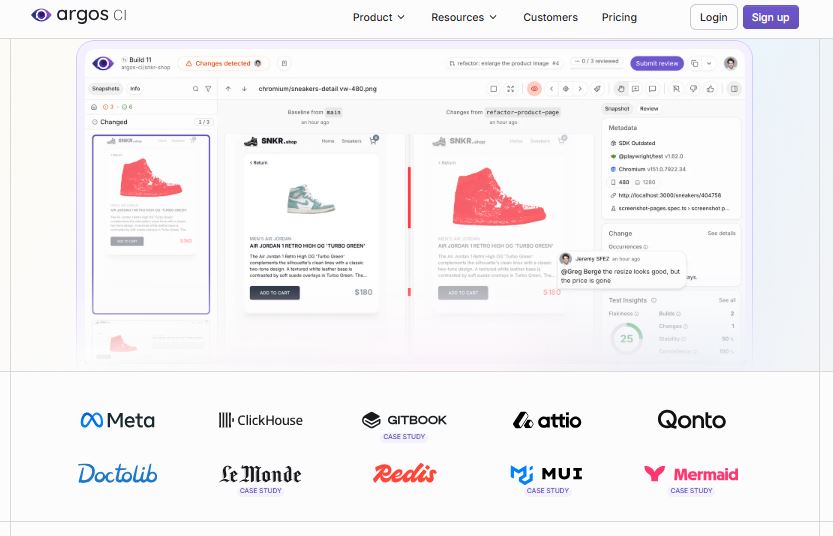
Argos: AI Powered Visual Testing and Code Quality Tool It is a visual testing platform that helps developers find unexpected changes in websites and applications. It compares screenshots and files between software versions to identify possible errors before updates are released. Argos supports tools such as Playwright, Storybook, Vitest, and Cypress. It also helps AI coding agents review changes, detect bugs, and create preview deployments. Argos is useful for developers, software teams, and businesses that want to maintain website quality.
5 Benefits of Using of Argos

  1. Saves Time – Automates visual checks and reduces manual testing.
  2. Improves Website Quality – Helps identify visual errors before release.
  3. Speeds Up Code Reviews – Makes changes easier to understand.
  4. Supports AI Development – Allows compatible AI agents to inspect and review changes.
  5. Improves Team Collaboration – Provides shared reviews and preview links.

Features of Argos

  • Visual Regression Testing: Argos compares screenshots from different builds to identify visual changes, such as broken layouts, missing elements, and incorrect styling.
  • Automated Screenshot Comparison: It captures and compares screenshots during automated tests. This helps developers find visual problems before they reach users.
  • AI Agent Integration: Argos works with AI coding agents through its CLI, REST API, and MCP server. Agents can inspect changes, review test results, and help fix detected problems.
  • Live Preview Deployments: Argos creates preview links for pull requests, allowing developers and reviewers to check website changes before merging code.
  • Flaky Test Detection: Argos tracks unstable tests and helps developers investigate repeated failures. This makes testing more reliable and debugging easier.

Also Check : Search Engine Optimization Work from Home Internship at NoBroker

5 Problems with their solutions that Argos can solve it

1. Problem: Website layouts may break after code updates.

Solution: Argos compares screenshots to identify unexpected visual changes.

2. Problem: Manual website testing takes too much time.

Solution: Argos automates screenshot comparison within development workflows.

3. Problem: Small visual bugs can reach production unnoticed.

Solution: Argos highlights changes so developers can review them before release.

4. Problem: Unstable tests make debugging difficult.

Solution: Argos tracks flaky tests and provides test history to help find the cause.

5. Problem: Reviewing website changes across a team can be challenging.

Solution: Argos provides shared reviews and preview deployments for developers and reviewers.

Frequently Asked Questions about Argos

Q1. What is Argos used for?
Argos is used for visual regression testing, screenshot comparison, and reviewing software changes.

Q2. Is Argos free?
Yes. Its Hobby plan is free and includes up to 5,000 screenshots.

Q3. Which testing tools does Argos support?
It supports Playwright, Storybook, Vitest, Cypress, and other screenshot-producing workflows.

Q4. Can Argos work with AI coding agents?
Yes. It provides CLI, REST API, and MCP server access for compatible AI agents.

Q5. Who should use Argos?
Frontend developers, QA engineers, software teams, and businesses that want reliable visual testing can benefit from Argos.

Argos: Pricing Plan

Hobby Plan – $0/month
The free Hobby plan includes up to 5,000 screenshots, visual and snapshot testing, Storybook and static deployments, CLI and REST API access, GitHub and GitLab integration, and community support.

Pro Plan – From $100/month
The Pro plan includes 35,000 screenshots, team collaboration, reviews, private deployment protection, custom deployment domains, Slack and Microsoft Teams notifications, and professional support. Additional screenshots are charged according to usage.

Enterprise Plan – Custom Pricing
The Enterprise plan includes custom screenshot limits, SAML single sign-on, detailed access controls, dedicated support, and a 99.99% uptime service-level agreement.

Conclusion

Argos is a useful visual testing tool for teams that want to find website errors before releasing updates. Its screenshot comparisons, automated testing, flaky test detection, and AI agent integrations help developers improve software quality and review changes faster. With a free plan for smaller projects and paid options for larger teams, Argos offers flexible choices for different testing needs

Also Check : ChatHop: AI Chat Transfer Tool for Switching Between AI Assistants

CIGMA Pedia Scholarship Finder: find the scholarships that match you in 8 quick questions