



All India Scholarship Helpline : 8050067687

Tucky

Last Update On

Staff 3

Tucky: AI Notes and Productivity Assistant for Mac

CIGMA Pedia Whatsapp Community

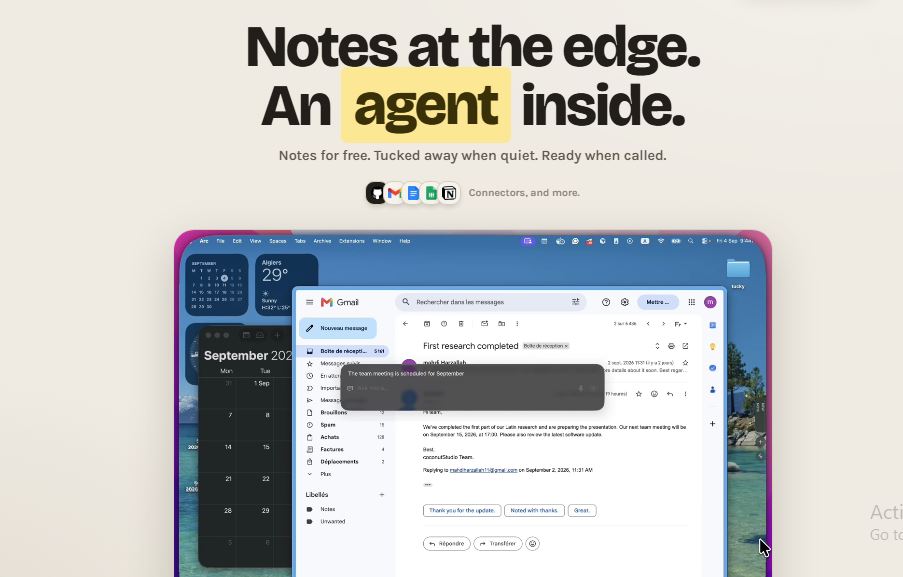
Tucky: AI Notes and Productivity Assistant for Mac It is an AI powered notes and productivity app for Mac users. It keeps notes neatly tucked along the edge of your screen so they are easy to access without opening another window. Tucky also includes an AI assistant that can help users write, search, rewrite, and work with their notes. It can connect with apps such as Gmail, Google Calendar, Google Docs, Google Sheets, GitHub, and Notion. Tucky combines digital notes with an AI assistant. Users can create notes, add tasks, use Markdown, and ask the AI questions without leaving their current application. The app is designed to stay out of the way until users need it, making it useful for quick notes, planning, writing, and everyday productivity.
5 Benefits of Using of Tucky

  1. Saves Time – Quick access to notes and AI reduces unnecessary app switching.
  2. Easy to Use – Users can access notes and AI through simple shortcuts.
  3. Keeps Notes Organized – Notes stay neatly positioned along the screen edge.
  4. Supports AI Writing – Tucky can help with writing, editing, and questions.
  5. Works With Other Apps – Connectors bring supported services into the Tucky workflow.

Features of Tucky

  • Notes on the Screen Edge: Tucky keeps notes docked to the edge of the Mac screen. Users can quickly reach their notes without opening a separate application.
  • AI Assistant: Users can ask Tucky to write, rewrite, search, or answer questions. The AI assistant can be opened from any application using a global keyboard shortcut.
  • AI for Individual Notes: Tucky can work with a specific note. Users can ask questions about a note while controlling when the note’s content is shared with the AI.
  • App Connectors: Tucky Plus supports connections with Gmail, Google Calendar, Google Docs, Google Sheets, GitHub, and Notion. This allows users to work with information from connected services.
  • Privacy and Local Storage: Tucky states that notes are encrypted on the Mac and that its notes remain on the user’s Mac. It also supports live Markdown, checkboxes, exports, and global shortcuts.

Also Check : UMY Scholarships 2027 for UG and PG Students

5 Problems with their solutions that Tucky can solve it

1. Problem: Important notes are difficult to access quickly.

Solution: Tucky keeps notes on the edge of the screen for quick access.

2. Problem: Switching between apps interrupts your workflow.

Solution: The AI assistant can be opened with a keyboard shortcut without leaving the current app.

3. Problem: Rewriting notes takes extra time.

Solution: Tucky’s AI can help write and rewrite content directly from the desktop.

4. Problem: Information is spread across different applications.

Solution: Connectors allow Tucky Plus users to work with supported services such as Gmail, Calendar, Docs, Sheets, GitHub, and Notion.

5. Problem: Managing small tasks and reminders is difficult.

Solution: Tucky provides checkbox tasks and easily accessible notes for organizing everyday work.

Frequently Asked Questions about Tucky

Q1. What is Tucky?
Tucky is an AI-powered notes and productivity app designed for Mac users.

Q2. Is Tucky available for Windows?
Tucky’s current website lists support for macOS 15 or later, including Apple Silicon and Intel Macs.

Q3. Does Tucky have a free plan?
Yes. Tucky has a free plan with 240 hosted AI credits per month when users sign in.

Q4. What does Tucky Plus cost?
Tucky Plus costs $12 per month and includes 15,000 AI credits along with additional features and connectors.

Q5. Which apps can Tucky connect to?
Tucky Plus currently supports Gmail, Google Calendar, Google Docs, Google Sheets, GitHub, and Notion.

Tucky: Pricing Plan

Tucky currently offers two main plans:

  • Free – $0/month: Unlimited notes when signed in, 240 hosted AI credits per month, and the best AI model. Without signing in, users can keep five notes on their Mac.
  • Plus – $12/month: Includes 15,000 hosted AI credits each month, model selection, voice dictation in 60+ languages, and connectors for Gmail, Google Calendar, Google Docs, Google Sheets, GitHub, and Notion.

Also Check : Hr Recruitment Work from Home Internship at Red Hibiscus Info Solutions

Conclusion

Tucky is a simple AI notes and productivity tool designed to keep information close while users work on their Mac. Its edge-based notes, AI assistant, shortcuts, Markdown support, privacy features, and app connectors make it useful for everyday writing and organization. With a free plan and a $12 monthly Plus plan, Tucky provides options for users with different productivity needs

Also Check : AppStruct: Build Mobile, Web & Desktop Apps Without Coding