



All India Scholarship Helpline : 8050067687

Sourcetable

Last Update On

Staff 3

Sourcetable: AI Powered Tool to Convert Unstructured Data into Spreadsheets

CIGMA Pedia Whatsapp Community

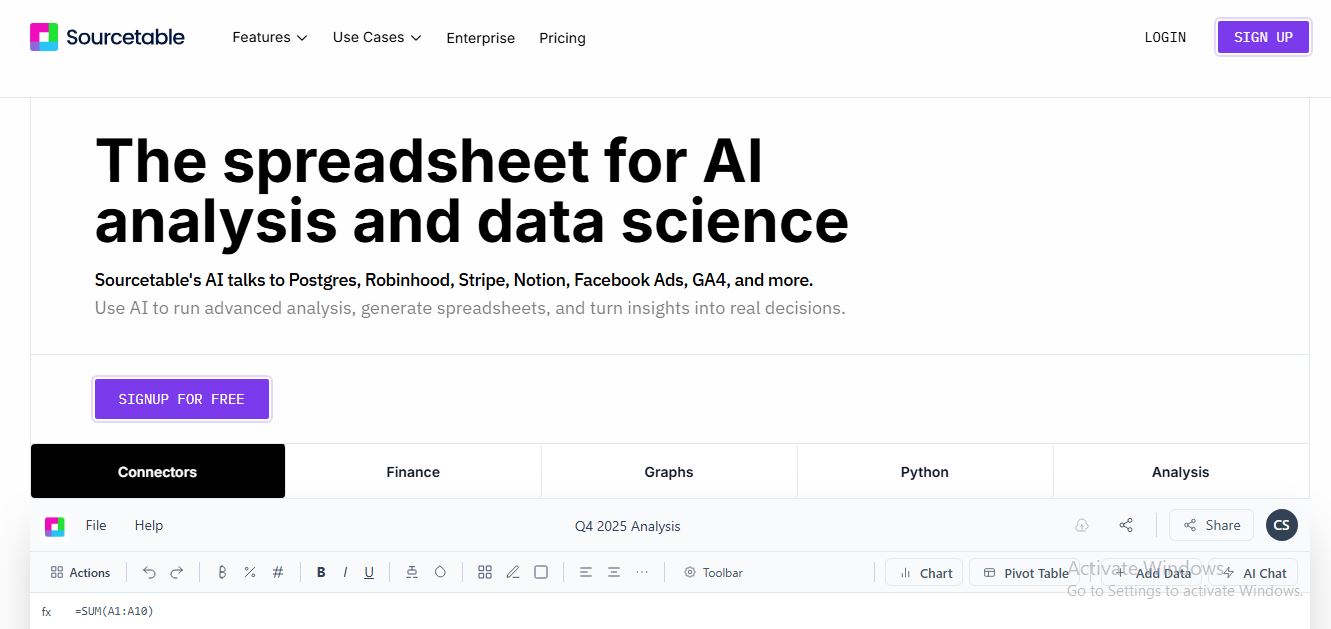
Messy2Sheet: AI Powered Tool to Convert Unstructured Data into Spreadsheets Sourcetable is an AI-powered spreadsheet and data analysis platform that combines the familiar features of spreadsheets with AI, data connectors, and advanced analytics. Users can upload files, connect databases and applications, ask questions about data in plain English, create formulas, clean datasets, and generate charts. Sourcetable is designed to help businesses, analysts, researchers, and spreadsheet users work with data faster and with less manual effort.
5 Benefits of Using of Sourcetable

  1. Saves Time – Sourcetable uses AI to automate spreadsheet analysis, data cleaning, formulas, and repetitive data tasks.
  2. Easy Data Analysis – Users can ask questions about their data in plain English instead of writing complex formulas or queries.
  3. Connects Multiple Data Sources – Sourcetable allows users to bring data from spreadsheets, databases, applications, and files into one workspace.
  4. Creates Better Reports – AI-generated charts, graphs, summaries, and visualizations help users understand and present their data more easily.
  5. Supports Advanced Users – Developers and data professionals can use SQL, Python, and data science libraries when they need more control over their analysis.

Features of Sourcetable

  • AI Spreadsheet Assistant: Sourcetable provides an AI assistant that can answer questions about spreadsheet data, create formulas, analyze information, and help users complete spreadsheet tasks using natural language.
  • Data Connectors: Sourcetable can connect to databases, applications, and files. Supported sources include Excel, CSV, PDF, JSON, MySQL, PostgreSQL, MongoDB, Google Sheets, and other data sources.
  • Data Analysis and Cleaning: Users can ask AI to clean, transform, organize, and analyze data. Sourcetable also supports advanced tools such as Python, SQL, Pandas, NumPy, SciPy, and Scikit-learn.
  • Charts and Visualizations: Sourcetable can create charts and graphs from data using natural-language instructions. Visualizations can be downloaded or shared as interactive embeds.
  • AI Research and Automation: Sourcetable includes AI research capabilities, smart formulas, pivots, data generation, Excel template generation, and data transformation tools. Pro and Max plans provide additional AI capabilities and advanced analysis features.

Also Check : Jefferson Scholarship 2027 for UG Students

5 Problems with their solutions that Sourcetable can solve it

1. Problem: Analyzing large spreadsheets manually takes too much time

Solution: Sourcetable’s AI can analyze spreadsheet data and answer questions using natural language

2. Problem: Users struggle with complex spreadsheet formulas.

Solution: The AI spreadsheet assistant can create smart formulas and help users complete spreadsheet tasks.

3. Problem: Data is stored across many different sources.

Solution: Sourcetable’s data connectors allow users to connect files, databases, applications, and other data sources.

4. Problem: Creating charts and reports manually is repetitive.

Solution: Users can describe the visualization they want and Sourcetable can generate charts and graphs automatically.

5. Problem: Cleaning and transforming raw data requires technical skills.

Solution: Sourcetable can use AI to clean, organize, and transform data, while also providing Python and SQL tools for advanced workflows.

Frequently Asked Questions about Sourcetable

Q1. What is Sourcetable used for?
Sourcetable is used for spreadsheet management, data analysis, data cleaning, reporting, visualization, research, and business intelligence.

Q2. Can Sourcetable analyze Excel files?
Yes. Users can upload Excel files and ask the AI questions about their data.

Q3. Does Sourcetable support databases?
Yes. Sourcetable supports databases such as MySQL, PostgreSQL, MongoDB, BigQuery, and other data sources through its connectors.

Q4. Is Sourcetable free?
Yes. Sourcetable has a free Regular plan with 50 AI credits per month. Users can upgrade to Pro or Max for additional AI features and higher credit limits.

Q5. Can Sourcetable create charts?
Yes. Users can describe the chart or graph they want, and Sourcetable can generate visualizations from their data.

Sourcetable: Pricing Plan

Regular Plan – Free
The Regular plan is free and includes 50 AI credits per user per month. It provides the AI spreadsheet assistant, AI analysis and summaries, smart formulas, pivots, charts, visualizations, data cleaning, data generation, and access to data connectors.

Pro Plan – $29 per User per Month
The Pro plan includes 2,000 credits per month and adds Deep Research, premium AI models, a Python and data science toolkit, expanded AI memory and context, SQL tools, and other advanced capabilities.

Max Plan – $100 per User per Month
The Max plan includes 6,000 credits per month and provides the highest model intelligence, advanced agent capabilities, maximum chat memory and context, unlimited AI messages subject to abuse guardrails, and early access to new AI features and models.

Extra Credits
Users can purchase additional one-time credits when needed. These credits do not expire. Sourcetable currently lists extra-credit options for Pro and Max users.

Also Check : Artificial Intelligence (AI) Work from Home Internship at Tripple One Solutions

Conclusion

Sourcetable is a powerful AI spreadsheet and data analysis tool that combines traditional spreadsheet features with modern AI capabilities. Its natural-language analysis, data connectors, automated cleaning, charts, research tools, Python support, and SQL capabilities make data work faster and easier. With a free plan and paid options for users who need more AI power, Sourcetable is a useful solution for individuals, analysts, researchers, and businesses looking to get more value from their data

Also Check : Messy2Sheet: AI Powered Tool to Convert Unstructured Data into Spreadsheets