




All India Scholarship Helpline : 8050067687

Cursor

Last Update On

Staff 3

Cursor: The AI Code Editor That Helps You Build Software Faster

CIGMA Pedia Whatsapp Community

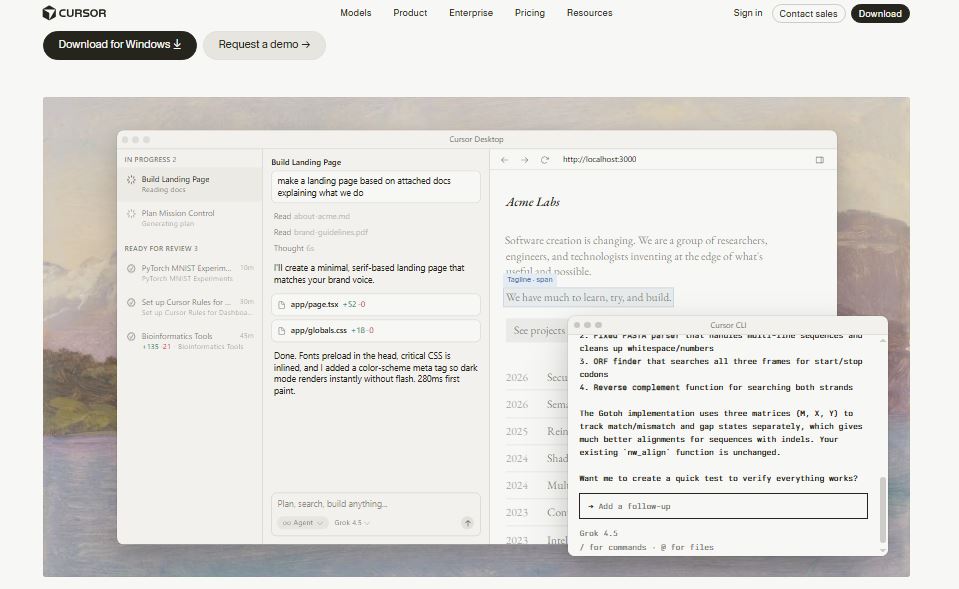
Cursor: The AI Code Editor That Helps You Build Software Faster Cursor is an AI powered code editor designed to help developers write, edit, debug, and understand code more efficiently. Built on top of Visual Studio Code (VS Code), Cursor combines a familiar coding environment with advanced AI features like code generation, smart autocomplete, AI chat, and agent-based coding. Whether you are a beginner learning to code or an experienced software engineer, Cursor can speed up development and improve productivity. It supports multiple programming languages and works with leading AI models to assist with coding tasks
5 Benefits of Using of Cursor

  • Speeds up software development with AI assistance.
  • Reduces coding errors through smart suggestions.
  • Makes debugging faster and easier.
  • Works with multiple programming languages.
  • Increases productivity for both beginners and experienced developers

Features of Cursor

  • AI Code Generation: Cursor can generate code from natural language prompts. Simply describe what you want to build, and the AI writes the code for you.
  • Smart Code Autocomplete: The editor predicts your next lines of code, helping you write software faster with fewer mistakes.
  • AI Chat Assistant: Ask coding questions directly inside the editor. Cursor explains code, fixes errors, and suggests improvements without leaving your workspace.
  • Agent Mode: Cursor’s AI agents can perform multi-step coding tasks such as creating files, editing code, running tests, and helping with larger software projects.
  • Bug Detection and Fixes: The AI identifies coding errors and suggests fixes, making debugging faster and easier

Also Check : CA C P Agrawal Memorial Scholarship Programme 2026 for CA Students

5 Problems with their solutions that Cursor can solve it

1. Problem: Writing code takes too much time

Solution: Cursor generates code from simple text instructions, helping developers complete projects faster.

2. Problem: Debugging complex code is difficult

Solution: The AI finds bugs, explains the problem, and suggests possible fixes

3. Problem: Understanding large codebases is challenging

Solution: Cursor explains existing code and helps developers understand unfamiliar projects

4. Problem: Repetitive coding tasks reduce productivity

Solution: Smart autocomplete and AI code generation automate repetitive work

5. Problem: Switching between coding and searching for answers wastes time

Solution: The built-in AI chat answers programming questions directly inside the editor

Frequently Asked Questions about Cursor

Q1. What is Cursor used for?
Cursor is an AI code editor that helps developers write, edit, debug, and understand code more efficiently

Q2. Is Cursor free?
Yes. Cursor offers a free Hobby plan with basic AI coding features

Q3. Can Cursor replace Visual Studio Code?
Cursor is built on VS Code, so it offers a similar experience while adding powerful AI features

Q4. Which programming languages does Cursor support?
Cursor supports most popular programming languages, including Python, JavaScript, TypeScript, Java, C++, Go, Rust, and more

Q5. Who should use Cursor?
Cursor is ideal for software developers, students, freelancers, startups, and engineering teams who want to code faster with AI

Cursor: Pricing Plan

Hobby Plan – Free
The Hobby plan is free and includes limited AI agent requests, access to Composer, and basic AI coding features. No credit card is required.

Pro Plan – $20 per month
The Pro plan includes everything in the Hobby plan, plus extended AI agent limits, access to frontier AI models, cloud agents, MCPs, skills, hooks, and usage-based Bugbot support.

Pro+ Plan – Higher Usage Tier
The Pro+ plan includes everything in the Pro plan but offers approximately three times higher AI agent limits, making it suitable for developers with heavier coding workloads.

Ultra Plan – Premium Usage Tier
The Ultra plan includes everything in the Pro plan with approximately twenty times higher AI agent limits and priority access to new features. It is designed for power users and enterprise-level developers.

Cursor Start (India Only) – ₹649 per month
Cursor also offers a special Cursor Start plan for developers in India. It includes access to Grok 4.5, Composer, cloud agents, plugins, and more AI agent requests than the free plan

Also Check : Marketing Work from Home Internship at Linfohub

Conclusion

Cursor is one of the best AI-powered code editors available today. It combines the familiar experience of Visual Studio Code with advanced AI features like code generation, smart autocomplete, AI chat, and intelligent coding agents. Whether you’re building websites, mobile apps, APIs, or enterprise software, Cursor helps you write better code in less time. With a free plan, flexible paid options, and a special India-only plan, Cursor is an excellent choice for developers who want to improve productivity and simplify software development

Also Check : Vibeknow: Create Professional AI Knowledge Videos in Minutes