



Auto AE: In the competitive world of social media, simple video clips are often not enough to capture attention. Auto AE (AutoAE.online) is a revolutionary AI-powered motion graphics designer that allows creators to generate viral animations in seconds. It serves as a user-friendly alternative to complex software like Adobe After Effects, enabling anyone to create professional-grade text animations, 3D transformations, and data visualizations without any prior editing experience.
Contents
5 Benefits of Using of Auto AE
- Massive Time Savings: What takes hours in manual software takes minutes with AI.
- No Editing Skills Required: Perfect for beginners, YouTubers, and social media managers.
- High-Resolution Exports: Download your animations in 1080p Full HD for a crisp, pro-level finish.
- Commercial Licensing: Paid plans include a lifetime commercial license, making it safe for client work.
- Versatile Formats: Easily integrate animations into your existing edits or post them directly to social platforms.
Features of Auto AE
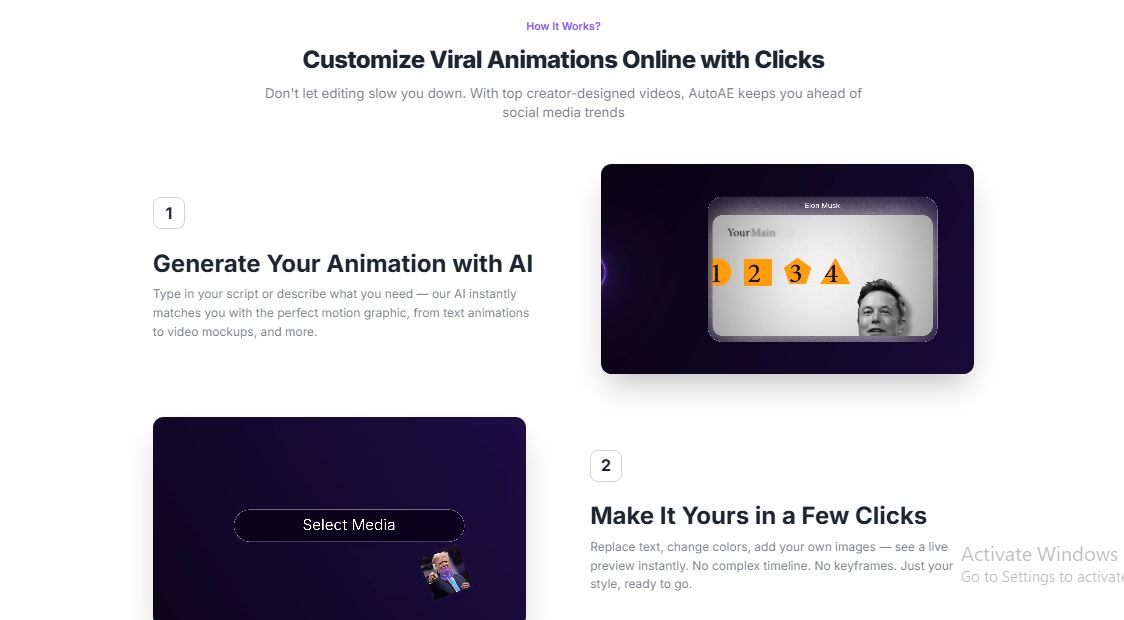
- AI Script-to-Animation: Auto AE uses natural language processing to understand your needs. You can simply type in your script or describe a scene, and the AI will instantly match your request with the perfect motion graphic template, from dynamic text reveals to complex video mockups.
- One-Click 3D Transformation: Transforming flat images into engaging 3D clips used to take hours of manual keyframing. With Auto AE, you can upload an image and convert it into a 3D animated version with a single click, instantly boosting the quality of your B-roll footage.
- Extensive Creator-Designed Library: The platform features a massive library of templates designed by top-tier motion artists. Whether you need a vintage tarot-style card flip, a shuriken reveal, or a clean progress tracker, the library is updated weekly to keep up with the latest YouTube and TikTok trends.
- Live Customization Interface: Unlike traditional software, Auto AE offers a “no-timeline” editing experience. You can replace text, change colors, and swap images in a few clicks, seeing a live preview of your changes instantly before downloading.
- Smart Data Visualization: Translating complex data into “can’t-skip” content is easy with Auto AE’s infographic tools. It includes animated flowcharts, donut charts, and causal relationship maps that turn dry statistics into engaging visual stories.
Also Check : University of Debrecen Stipendium Hungaricum Scholarship 2026 For UG, PG and P.hd Students
5 Problems with their solutions that Auto AE can solve it
Problem: Complex Learning Curve of After Effects
Solution: Auto AE removes the need for keyframes and timelines, allowing users to create professional animations through a simple “click and customize” interface.
Problem: High Costs of Hiring Motion Designers
Solution: Small businesses and solo creators can use Auto AE to produce agency-quality motion graphics for a fraction of the cost.
Problem: Boring Stock Footage or Static Images
Solution: The 3D Transformation feature breathes life into static pictures, turning them into high-quality 3D clips that keep viewers engaged.
Problem: Keeping Up with Viral Social Media Trends
Solution: Since the library updates weekly with trendy designs, creators can stay relevant without spending hours researching new styles.
Problem: Slow Production Times for Daily Content
Solution: By automating the motion design process, Auto AE allows you to go from a raw idea to a finished viral video in under an hour.
Frequently Asked Questions about Auto AE
Q1. Is Auto AE actually After Effects?
No, it is a web-based AI tool that simplifies the results of After Effects without needing the software itself.
Q2. Can I use my own images and logos?
Yes, all templates allow you to upload your own assets to maintain your brand identity.
Q3. Do I need a powerful computer?
No, all rendering happens in the cloud, so you can use it on any standard laptop or browser.
Q4. Is there a free trial?
Yes, you can start for free to test the templates and export your first few animations.
Q5. Can I use the videos for YouTube monetization?
Yes, as long as you are on a paid plan (Starter or higher), you receive a commercial license.
Auto AE : Pricing Plan
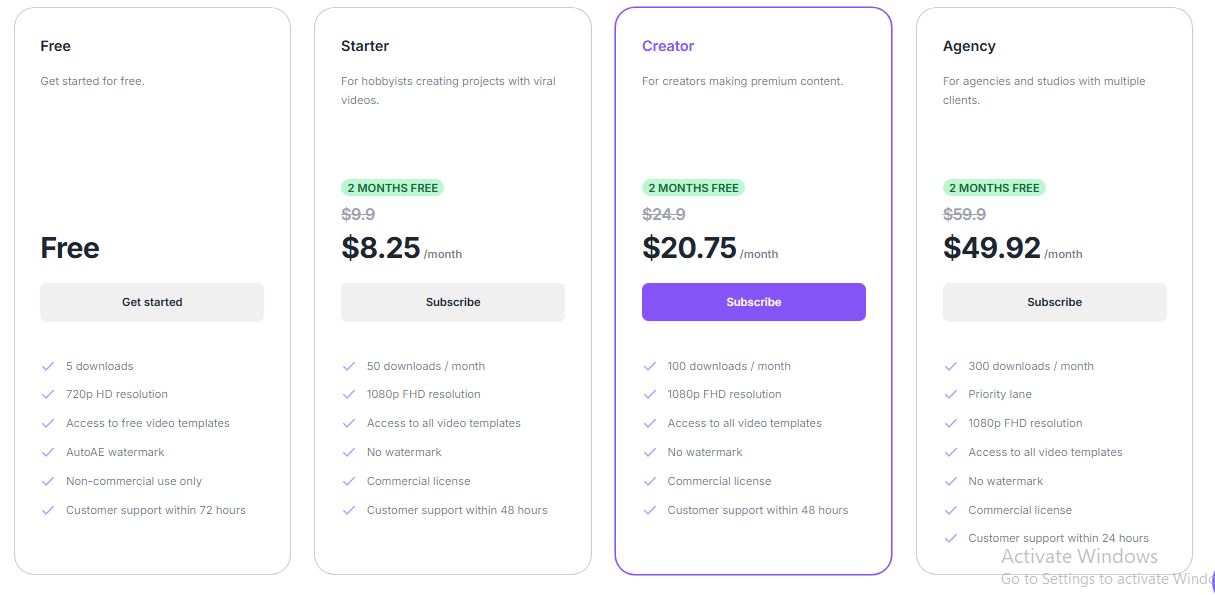
- Free Plan: 5 downloads/month in 720p HD. Includes a watermark and is for non-commercial use only.
- Starter Plan (~$8.25/mo): 50 downloads/month in 1080p, no watermark, and includes a commercial license.
- Creator Plan (~$20.75/mo): 100 downloads/month, access to all premium templates, and priority support.
- One-Time Purchase: Need just one video? You can buy a single high-quality export for $2.90 with no recurring charges.
Also Check : Business Development Work From Home Part Time Internship by JP IT STAFFING LLC
Conclusion
Auto AE is changing the game for content creators who want “million-subscriber” quality without the “million-dollar” budget. By bridging the gap between professional motion design and simple AI commands, it allows you to focus on your story while the AI handles the visuals. If you want to transform your plain clips into viral hooks, Auto AE is the tool you’ve been searching for